
Microsoft 365 in 2026: Stop Wasting Your IT Budget on the Wrong Plan
October 30, 2026
Are You Paying for Microsoft 365 Features You Don’t Even Use?
Most businesses know Microsoft 365 as the home of Word, Excel, and PowerPoint. But treating it just as a productivity suite または an office suite is a massive missed opportunity—and a constant drain on your IT budget.
Microsoft 365 is a comprehensive, subscription-based cloud productivity platform designed to run your entire enterprise’s communication, file management, and security. However, with dozens of licensing tiers available, a significant number of companies are overpaying for features they don’t need, underutilizing the tools they are paying for, or exposing themselves to security risks.
Here is everything you need to know to stop wasting money, eliminate redundant software subscriptions, and start maximizing your Microsoft 365 investment.
Table of Contents
1. The Cost Trap: Microsoft 365 vs. Office 365
If you are confused by the naming conventions, you are not alone. Microsoft transitioned most of its “Office 365” business plans to “Microsoft 365” to reflect the inclusion of advanced cloud services, security, and device management tools alongside traditional apps.
While legacy enterprise plans (like Office 365 E1, E3, E5) still exist, the standard business tiers are now Microsoft 365 Business Basic, Standard, and Premium. Understanding the difference is your first step to cutting costs. Paying for a Premium tier when your frontline workers only need Basic web apps is one of the most common ways companies drain their IT budget.
2. The Microsoft 365 Ecosystem: What Are You Actually Paying For?
When utilized correctly, Microsoft 365 eliminates the need for third-party tools like Zoom, Slack, Trello, or Dropbox. Consolidating your tech stack into M365 is the fastest way to see an immediate return on investment.
Here is a breakdown of the core applications included in most business plans and how they can replace your existing paid subscriptions:
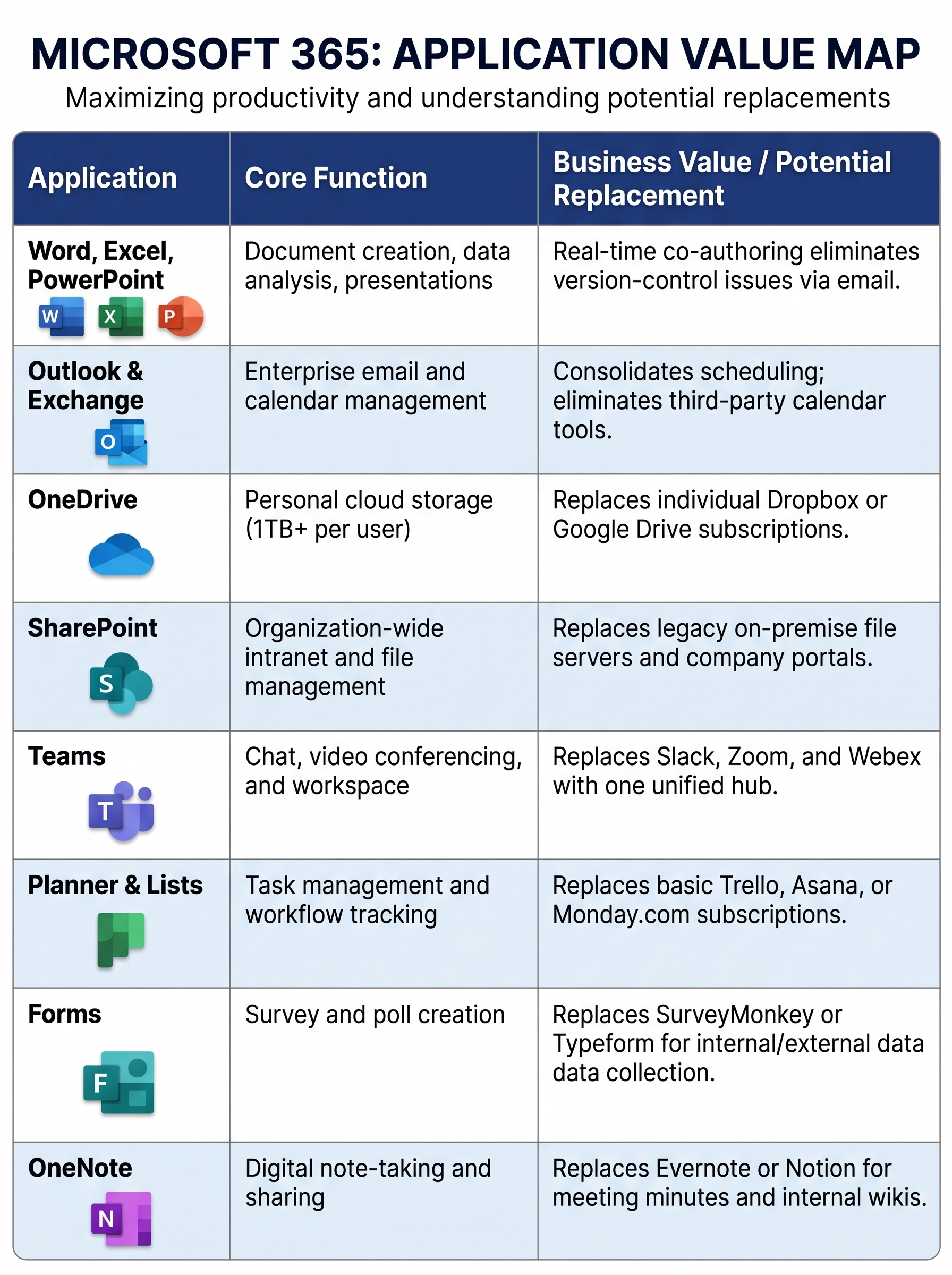
(Note: Application availability depends on your specific licensing tier. Always verify current plan inclusions with Microsoft.)
Stop Guessing Your Licensing Needs
Not sure if your team is utilizing the apps you are paying for? Don’t blindly lock yourself into an annual contract.
[Talk to our M365 Licensing Experts for a Free Cost-Optimization Audit →]
3. The True ROI: 4 Business Benefits of M365
Moving to Microsoft 365 is not just about renting software; it is about modernizing your IT infrastructure.
- No More CAPEX on Legacy Software: Microsoft 365 Apps are continuously updated with new features and security patches. Now that legacy, perpetual software like Office 2016 and 2019 reached end of support in October 2025, moving to a subscription model prevents security vulnerabilities and eliminates disruptive, company-wide software rollouts.
- Work From Anywhere (Without Hardware Bottlenecks): Eligible plans allow users to install Microsoft 365 apps on up to 5 PCs/Macs, 5 tablets, and 5 smartphones per user. This empowers remote work, fieldwork, and BYOD (Bring Your Own Device) policies securely.
- Centralized License Management: For IT departments, tracking who has what software is a major headache. The M365 admin center allows you to instantly assign or revoke licenses during employee onboarding and offboarding. This prevents you from paying monthly fees for “ghost” licenses belonging to ex-employees.
- Built-in Endpoint Security: Higher-tier plans (like Business Premium) include Microsoft Defender and Intune. This allows you to secure company data on employee-owned devices, enforce multi-factor authentication (MFA), and protect against ransomware—often costing less than buying standalone security software.
4. Three Rules for Choosing the Right Plan
Do not select a plan based purely on the lowest per-user price. Base it on your operational reality.
- Identify Desktop vs. Web Needs: If your team works entirely from browser-based tools, Business Basic (which only includes web and mobile app versions) will lead to substantial cost savings. If they require advanced offline functionality and desktop apps, you need Standard or Premium.
- Audit Your Security Posture: With remote work becoming standard, basic plans often leave vulnerabilities. If you need advanced identity management, threat protection, and device wiping capabilities, Business Premium is the most cost-effective all-in-one solution.
- Check Teams Inclusion: Microsoft recently unbundled Teams from certain enterprise plans in specific regions. Always confirm whether the plan you are purchasing includes Teams or if it requires a standalone license.
5. The Hidden Risk: Implementation and Maintenance
Purchasing the licenses is only 10% of the battle. The real challenge is migrating your existing data without downtime and establishing governance.
Rolling out M365 without strict operational rules leads to data chaos. If you do not establish policies—such as “Store personal drafts in OneDrive, but publish final project files to SharePoint”—your data will become siloed and impossible to find. Furthermore, leaving license provisioning and security configurations to non-technical administrative staff often results in lost data, security breaches, and low employee adoption rates.
6. Expert Consultation: Maximize Your M365 Investment with ISF NET
Migrating to Microsoft 365 shouldn’t disrupt your business, and managing it shouldn’t consume your IT department’s valuable time.
At ISF NET, we handle the entire lifecycle of your Microsoft 365 deployment. We cover everything from auditing your current infrastructure to ensure you buy the exact licenses you need, to seamless data migration, custom security configurations, and ongoing help-desk (LCM) support for your employees.
Don’t let software bloat drain your budget. Let the experts configure your perfect workspace.
Return to the page of Managed Service of the bilingual help desk and onsite | ISF NET, INC.